
Sandy has an in-built soil database, so there is no requirement for you to add soil sampling results if you don't have them. In the absence of soil sampling test results, Sandy will populate this information based on the geographic information of where your farm is located.
For those fields where tests have taken place, and if you want to include this data into Sandy then progress to enter the results for each of the fields that have been tested. This can either be added through manual onboarding or via excel.
To enter data into Sandy directly go to sandy setup / activate services / carbon / arable / soil and then click on manage data.
For excel onboarding, please select the farm, field, and harvest year (columns A, B and C) and follow by entering the data provided by your chosen soil testing body.
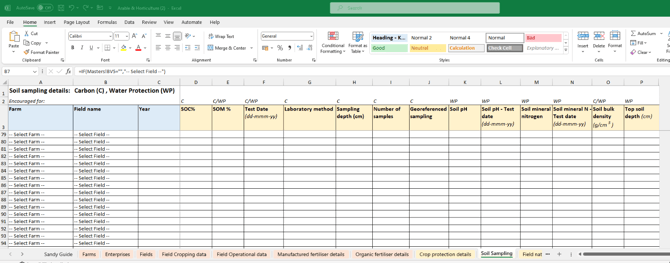
If you are new to soil sampling, these are the golden rules for soil sampling process to ensure consistent and accurate results from your provider:
-
Sample to at least 30cm if possible, ideally also 60cm
-
There are no major differences between LOI (loss on ignition) or Dumas in terms of methodology, but direct lab SOC (soil organic carbon) assessment is considered more detailed than either SOM (soil organic matter) method
-
Geo-reference your samples
-
The more samples / ha you can take the better. At least 1 sample / ha is needed for any kind of accuracy
-
More sampling rounds are better than fewer. Annual sampling is ideal but costly. 3-yearly or even 5-yearly is typical. May farms choose to rotate areas of the farm for annual testing.