
Note: Please ensure that all of your arable onboarding is completed within setup if you are onboarding arable. Please also ensure that your livestock enterprises have been selected in initial Farm and Account Setup.
Step 1
-
Navigate to Sandy's Homepage. Then click into Sustainability on the left-hand side. Next, select Carbon, and finally Carbon Calculator.

Step 2
-
Click the button on the right hand side, + Start new calculation.
.png?width=644&height=340&name=image%20(1).png)

Step 3
-
Next, set up your calculation by filling in the fields required with a name, year, farms, enterprises, and fields.
-
In the next field, Is this an Actual Calculation, you can select either ‘yes’ or ‘no’ from the drop down box. This field allows for scenario planning. If the calculation is for a scenario, leave it as No so that you can edit it later.

-
If you would like to replicate data from an existing carbon footprint in the future, scroll down to section 6, and choose what data you would like to replicate and its source.
-
Scroll up and click the Next button once you have selected your chosen parameters, and progress to the next page.
Step 4
-
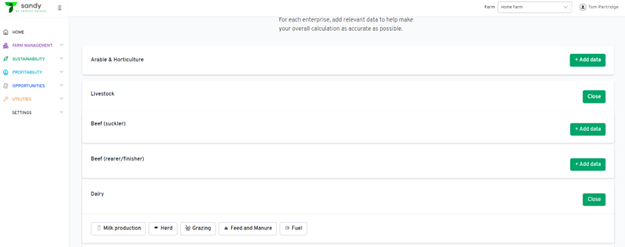
Click into the relevant enterprise via the + Add data buttons.
-
Then, click into and complete the subcategories e.g. Milk production, etc. As within the arable section of Sandy, there are required, encouraged, and optional data categories. The more encouraged and optional data provided, the more accurate the carbon footprint will be.
-
If you do not have some of the data requested, select the Use default box.
-
Save each section once completed.
Step 5
-
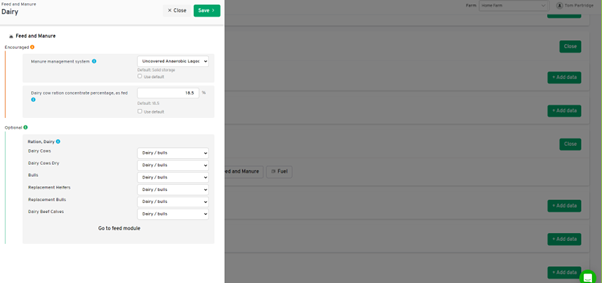
Within the Feed and Manure section, where applicable, select the Go to feed module button at the bottom of the pop-out window.
-
You can view the default mix make-ups and also create your own. We recommend that you make your own to improve accuracy in your carbon footprint.
Step 6
-
Once each section is completed and saved, you can run your carbon footprint. you can replicate this data if and when you need to create a new carbon footprint.